The new Web UI Tech Preview is officially available as of this week. Initially, we planned to develop the new design exclusively for the upcoming ownCloud Infinite Scale architecture. However, we decided to also support ownCloud 10 as a backend. With the new Web UI, ownCloud users will benefit from the following additions and improvements:
Main navigation on top: App switcher, global search, dark mode and new account menu
The most significant change to the basic layout is that the top bar is now instantly recognizable as the main navigation bar.
On the left, you will find the ’app switcher’, which allows you to switch between different applications in the ownCloud interface, such as files and chat tools. It will also be possible to switch to more apps in future.
In the middle of the top bar is the search bar. The new global search is prepared for searching not only for files, but also for content in other apps like chat messages.
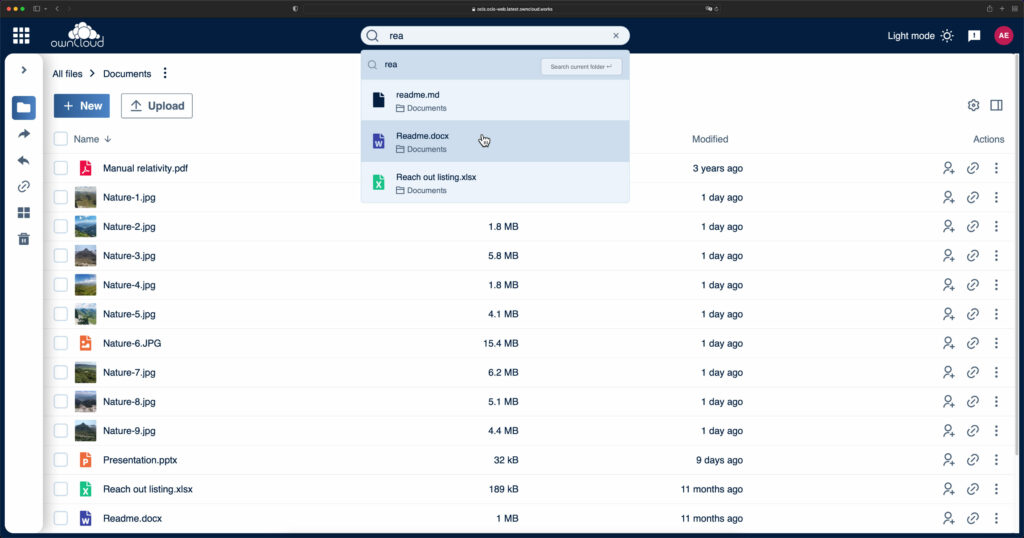
On the right side, you can now turn on the new dark mode for ownCloud – an option that many of you asked for.
On the far right of the top bar is the redesigned account menu, which now also shows the amount of storage space still available (personal quota).
Collapsible left sidebar and new icons
The application-specific navigation is located in the left sidebar as before. The sidebar has been made collapsible by request of many users, so that the area of the application main window can be maximized.
For all icons in the sidebar and the main window, we use a new unified design set. In addition, the filetype icons are color-coded for example, PDF files are red, spreadsheets are green and zip archives are yellow.
Context menu now also accessible via right click
The context menu with the most important app functions can now be opened via right click, a usability feature welcomed by many test users. This allows users to perform typical actions even faster, for example, downloading documents or opening documents in the Collabora and OnlyOffice office apps.
Easier document sharing
The new Web UI makes sharing content easier. Quick Action icons enable you to open files and folders with a single click. It’s just as easy to invite users as viewers or editors to view or collaborate on documents.

Improved accessibility
We have added new accessibility features to the ownCloud user interface. The new Web UI can be controlled completely via keyboard, offers improved color contrast for better readability, and supports navigation and operation via screen reader. We are thus meeting the requirements of many users in the public sector, such as educational and government institutions.
In addition to these new features, we also optimized a few other features in the frontend design of ownCloud. These include, among others, the rounded windows and the “shimmer effect” while the data of a directory is loaded from the server.
Users of the upcoming platform ownCloud Infinite Scale use the new Web UI out of the box.
Have fun testing the new Tech Preview. ownCloud 10 administrators can activate the new Web UI for their environment right away. Everything they need to know about it can be found in the documentation:
Web UI for ownCloud 10 – Docs getting started (for admins):